subagent-fleet
Run Claude Code-style subagents across your local model fleet.
subagent-fleet is a local AI compute control plane for Claude Code and coding agents. It maps coding subagents to the best Ollama model and machine you own, then generates LiteLLM and Claude Code-style agent configuration — with real-time health monitoring, SSE dashboards, execution tracing, and model warmup.






Quickstart • Configuration • Examples • Generated Files • Security • Roadmap
Overview
Local model users often have more than one useful machine: a laptop, a Mac mini, a workstation, a home server, or a spare GPU box. Most coding harnesses still point at one model endpoint.
subagent-fleet turns that setup into a private local subagent fleet:
planner     -> small fast model on a lightweight node
implementer -> larger coding model on a bigger node
reviewer    -> larger coding model on a bigger node
summarizer  -> small local model on the controller
It does not replace Ollama, LiteLLM, or Claude Code. It generates the glue between them:
Claude Code / coding harness
        |
        v
LiteLLM gateway generated by subagent-fleet
        |
        +-- Ollama node: laptop
        +-- Ollama node: Mac mini 64GB
        +-- Ollama node: workstation
Features
- Monitor node health in real time — unreachable nodes are isolated automatically.
- Route subagents by role: planner → fast model, implementer → large coding model.
- Warm models before workflows start, with live dashboard progress.
- Stream and trace LiteLLM execution logs in real time.
- Generate LiteLLM and Claude Code agent configuration from
fleet.yaml. - Validate, discover, and inspect your fleet with a single command.
Status
v0.4.0 — queue-aware scheduler and dynamic routing release.
Interactive Fleet Dashboard
Run subagent-fleet ui to open a live-updating dashboard that monitors your fleet in real time via SSE:
| Panel | What it does |
|---|---|
| Node Health | Real-time online/offline status per node, with discovered Ollama models and endpoints. |
| Agent Routing | Which agent maps to which model on which node — instantly visible. |
| Live Trace Stream | Tail LiteLLM logs as they happen, colored by severity (routing → success → error). |
| Model Warmup Progress | Track preload status when you run subagent-fleet warmup before a coding session. |
Start the dashboard in one command — point it at your fleet config:
subagent-fleet ui --config fleet.yaml
# Opens http://localhost:8080
Here's what the Fleet Dashboard looks like monitoring a 3-node example fleet:
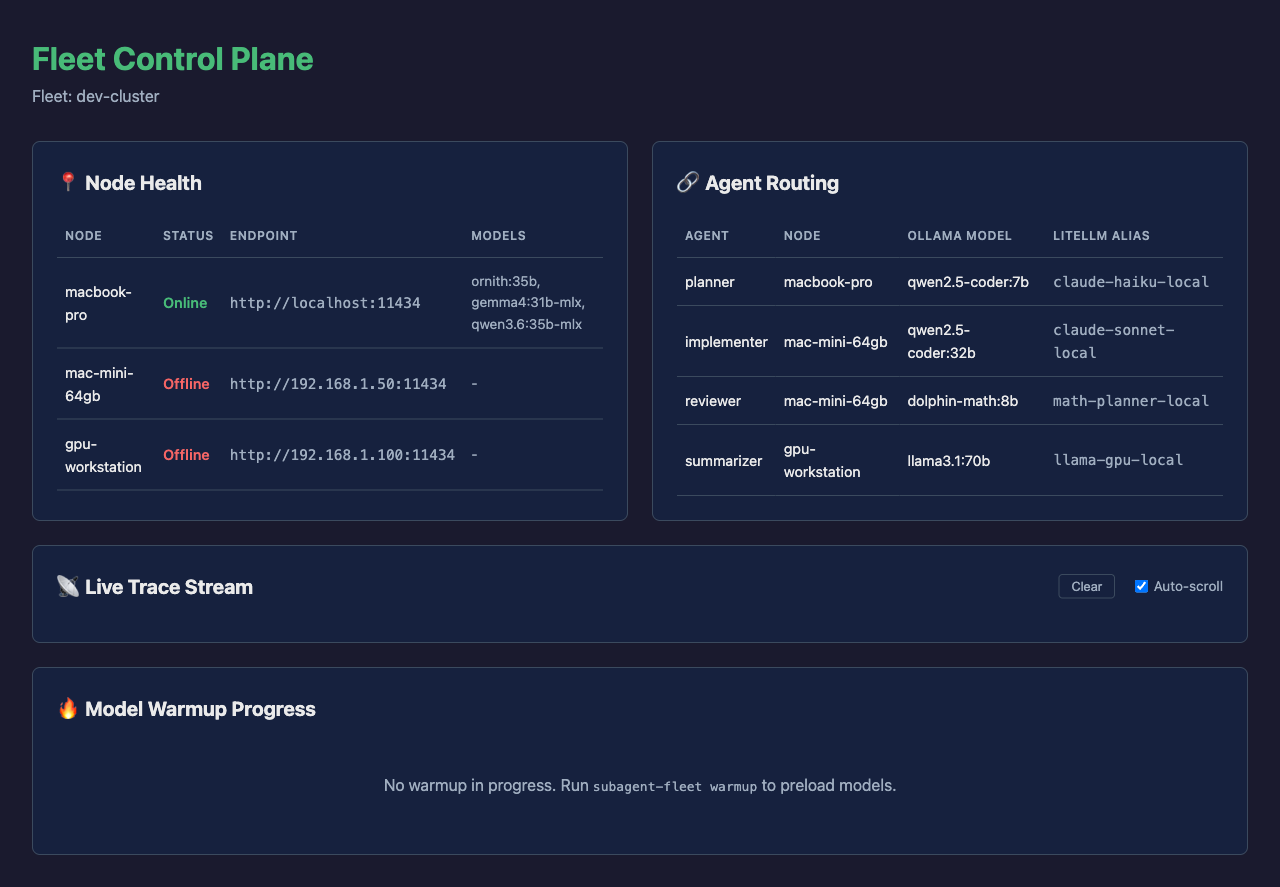
A responsive screenshot showing node health status, agent routing, trace stream, and warmup progress:
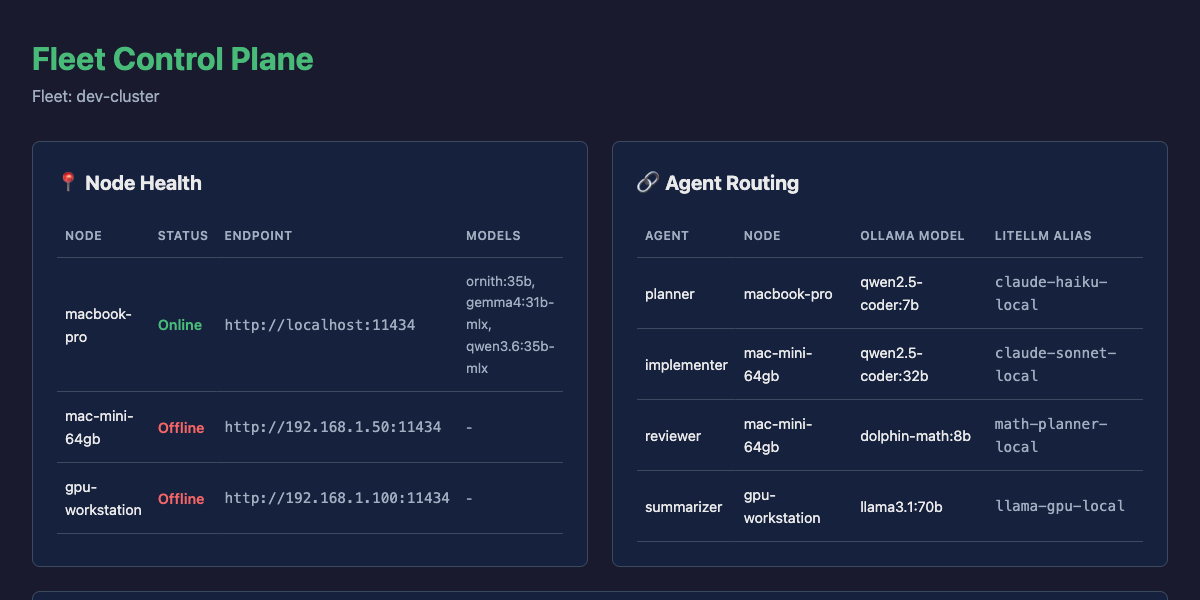
And it adapts to any screen size — mobile view included:
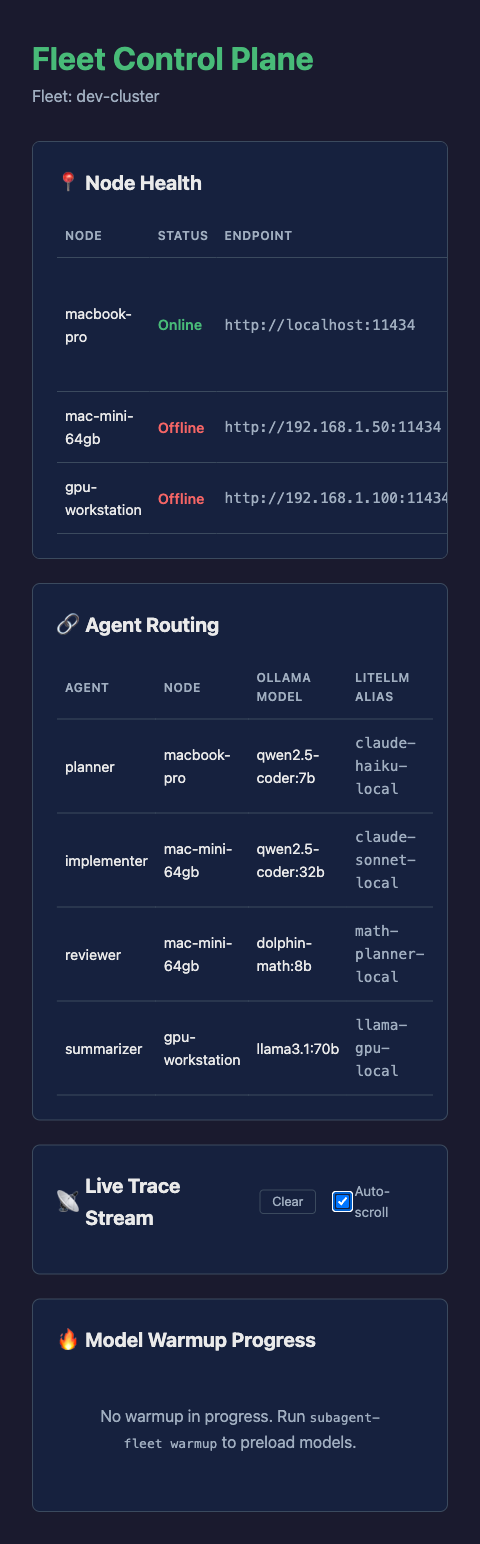
Available commands:
subagent-fleet init
subagent-fleet validate
subagent-fleet discover
subagent-fleet generate
subagent-fleet warmup
subagent-fleet status
subagent-fleet doctor
subagent-fleet clean
subagent-fleet benchmark
subagent-fleet eval frontier
subagent-fleet classify "implement a feature"
subagent-fleet route "implement a feature"
subagent-fleet routes
subagent-fleet schedule --task-type coding
subagent-fleet ui
subagent-fleet trace
subagent-fleet --version
subagent-fleet skills list
subagent-fleet skills install
subagent-fleet plugins install
Install
Choose one of the install paths below.
CLI from GitHub
Install the CLI directly from PyPI:
python -m pip install subagent-fleet
Or install it as an isolated command with pipx:
pipx install subagent-fleet
Verify:
subagent-fleet --help
Development Checkout
Use this when contributing to the project:
git clone https://github.com/adityak74/subagent-fleet.git
cd subagent-fleet
python -m pip install -e ".[dev]"
Run tests:
python -m pytest
Claude Code Plugin First
Install the plugin first from Claude Code, then let the bundled bootstrap skill install the CLI:
/plugin marketplace add https://github.com/adityak74/subagent-fleet
/plugin install subagent-fleet
After install, ask Claude Code:
Use the subagent-fleet bootstrap skill to install the CLI and set up this repo.
The bootstrap skill will run or recommend:
python -m pip install subagent-fleet
subagent-fleet skills install
Codex Plugin First
Install this repository as a local Codex marketplace:
codex plugin marketplace add .
codex plugin add subagent-fleet@subagent-fleet
Then ask Codex:
Use the subagent-fleet bootstrap skill to install the CLI and set up this repo.
Quickstart
Create a starter config:
subagent-fleet init
Edit fleet.yaml with your Ollama node endpoints and model names, then validate it:
subagent-fleet validate
Check which nodes are reachable:
subagent-fleet discover
Generate LiteLLM, Claude agent, and environment files:
subagent-fleet generate
Start LiteLLM:
export LITELLM_MASTER_KEY="sk-local-dev"

litellm \
  --config ./litellm_config.yaml \
  --host 127.0.0.1 \
  --port 4000
Point Claude Code at the local gateway:
source .env.subagent-fleet
claude
Configuration
subagent-fleet is driven by fleet.yaml.
project:
  name: local-dev
  gateway:
    provider: litellm
    host: 127.0.0.1
    port: 4000
    master_key_env: LITELLM_MASTER_KEY

nodes:
  m5-local:
    endpoint: http://localhost:11434
    tags: [controller, local, fast]

  m4-mini-64gb:
    endpoint: http://192.168.1.50:11434
    tags: [heavy, coder, reviewer]

  m4-mini-16gb:
    endpoint: http://192.168.1.51:11434
    tags: [small, planner, summarizer]

models:
  heavy-coder:
    node: m4-mini-64gb
    ollama_model: qwen2.5-coder:32b
    litellm_alias: claude-sonnet-local
    context: 32768
    timeout: 600
    max_parallel: 1

  small-coder:
    node: m4-mini-16gb
    ollama_model: qwen2.5-coder:7b
    litellm_alias: claude-haiku-local
    context: 8192
    timeout: 300
    max_parallel: 1

agents:
  planner:
    model: small-coder
    description: Use for planning, file discovery, task decomposition, and summarization.
    tools: [Read, Grep, Glob]
    prompt: |
      You are a fast local planning agent.
      Do not edit files.
      Return a concise response with:
      - plan
      - relevant files
      - risks
      - next recommended agent

  implementer:
    model: heavy-coder
    description: Use for implementation, bug fixes, refactors, and patch creation.
    tools: [Read, Grep, Glob, Edit, MultiEdit, Bash]

  reviewer:
    model: heavy-coder
    description: Use after implementation to review diffs, tests, regressions, and maintainability.
    tools: [Read, Grep, Glob, Bash]
Generated Files
Running:
subagent-fleet generate
creates:
litellm_config.yaml
.claude/agents/planner.md
.claude/agents/implementer.md
.claude/agents/reviewer.md
.env.subagent-fleet
Example LiteLLM route:
model_list:
  - model_name: claude-sonnet-local
    litellm_params:
      model: ollama_chat/qwen2.5-coder:32b
      api_base: http://192.168.1.50:11434
      api_key: ollama
      timeout: 600
    model_info:
      max_input_tokens: 32768
Example Claude agent:
---
name: planner
description: Use for planning, file discovery, task decomposition, and summarization.
model: claude-haiku-local
tools: Read, Grep, Glob
---

You are a fast local planning agent.
Do not edit files.
Return a concise response with:
- plan
- relevant files
- risks
- next recommended agent
Commands
| Command | Purpose |
|---|---|
subagent-fleet init |
Create a starter fleet.yaml. |
subagent-fleet validate |
Validate schema, references, URLs, aliases, and agent names. |
subagent-fleet discover |
Query configured Ollama nodes for available models. |
subagent-fleet generate |
Generate LiteLLM config, Claude agents, and env file. |
subagent-fleet warmup |
Preload configured Ollama models with keep_alive. |
subagent-fleet status |
Show node health and agent routing. |
subagent-fleet benchmark |
Benchmark node latency and rank the fleet. |
subagent-fleet eval frontier |
Run the fleet-vs-frontier coding quality/cost comparison. |
subagent-fleet classify |
Classify a message into a task type. |
subagent-fleet route |
Route a message to the best model/node. |
subagent-fleet routes |
Show the full task-type routing table. |
subagent-fleet schedule |
Compute queue-aware scheduling decisions. |
subagent-fleet doctor |
Show validation and local-network safety guidance. |
subagent-fleet clean |
List or remove generated files. |
subagent-fleet --version |
Print the installed CLI version. |
subagent-fleet skills list |
List bundled assistant skills and supported targets. |
subagent-fleet skills install |
Install assistant-facing setup and operations skills. |
subagent-fleet plugins install |
Install Claude Code and Codex plugin marketplace bundles. |
JSON output is available for discovery and status:
subagent-fleet discover --json
subagent-fleet status --json
Assistant Skills
subagent-fleet ships assistant-facing skills that teach Claude Code, Codex, OpenCode, and similar tools how to set up and operate the fleet from inside a repository.
List bundled skills and supported targets:
subagent-fleet skills list
Install all bundled skills for all supported targets:
subagent-fleet skills install
This writes:
.claude/skills/subagent-fleet-setup/SKILL.md
.claude/skills/subagent-fleet-operations/SKILL.md
.codex/skills/subagent-fleet-setup/SKILL.md
.codex/skills/subagent-fleet-operations/SKILL.md
.opencode/skills/subagent-fleet-setup/SKILL.md
.opencode/skills/subagent-fleet-operations/SKILL.md
Install for a specific assistant:
subagent-fleet skills install --target codex
subagent-fleet skills install --target claude-code
subagent-fleet skills install --target opencode
Install one bundled skill:
subagent-fleet skills install --skill subagent-fleet-setup
Existing skill files are not overwritten unless you pass --force.
Plugin Marketplaces
This repository also ships plugin marketplace metadata so users can install the assistant skill first, then let that skill install and verify the Python CLI.
Included plugin artifacts:
.claude-plugin/marketplace.json
.agents/plugins/marketplace.json
plugins/subagent-fleet/.claude-plugin/plugin.json
plugins/subagent-fleet/.codex-plugin/plugin.json
plugins/subagent-fleet/skills/subagent-fleet-bootstrap/SKILL.md
plugins/subagent-fleet/skills/subagent-fleet-setup/SKILL.md
plugins/subagent-fleet/skills/subagent-fleet-operations/SKILL.md
The bootstrap skill teaches Claude Code or Codex how to install the CLI:
python -m pip install subagent-fleet
and then install repo-local assistant skills:
subagent-fleet skills install
Claude Code plugin install flow:
/plugin marketplace add https://github.com/adityak74/subagent-fleet
/plugin install subagent-fleet
Codex local marketplace flow:
codex plugin marketplace add .
codex plugin add subagent-fleet@subagent-fleet
To generate the same marketplace/plugin bundle into another directory:
subagent-fleet plugins install --out /path/to/marketplace-root
Install only one target:
subagent-fleet plugins install --target claude-code
subagent-fleet plugins install --target codex
Existing plugin marketplace files are not overwritten unless you pass --force.
Ollama Worker Setup
On each worker machine, run Ollama on a private interface reachable from your controller:
launchctl setenv OLLAMA_HOST "0.0.0.0:11434"
launchctl setenv OLLAMA_KEEP_ALIVE "-1"
launchctl setenv OLLAMA_NUM_PARALLEL "1"
launchctl setenv OLLAMA_MAX_LOADED_MODELS "1"

killall Ollama
open -a Ollama
From the controller:
curl http://NODE_IP:11434/api/tags
Security
subagent-fleet assumes private local networking.
Do:
- Use LAN, firewall rules, Tailscale, WireGuard, or a private subnet.
- Keep
LITELLM_MASTER_KEYset for LiteLLM access. - Treat generated
.env.subagent-fleetfiles as local developer configuration.
Do not:
- Expose Ollama directly to the public internet.
- Expose LiteLLM without authentication.
- Commit real API keys, LAN secrets, or machine-specific private
.envfiles.
Run:
subagent-fleet doctor
for local setup and safety reminders.
Development
Install dev dependencies:
python -m pip install -e ".[dev]"
Run tests:
python -m pytest
Run a focused test:
python -m pytest tests/test_config.py
Check CLI wiring:
python -m subagent_fleet.cli --help
Project Layout
src/subagent_fleet/
  cli.py
  config.py
  discovery.py
  plugins.py
  warmup.py
  status.py
  skills.py
  generators/
  skill_templates/
  templates/

examples/
plugins/
tests/
Examples
See examples/ for complete fleet configurations and generated output:
| Directory | What it shows |
|---|---|
ollama-laptop-only/ |
Single-machine setup — everything on one laptop running Ollama |
multi-node-cluster/ |
Three-node fleet — laptop + Mac mini (64GB) + GPU workstation |
litellm-proxy/ |
Generated LiteLLM config showing how models route to nodes |
claude-agents/ |
Claude Code agent definitions generated from a fleet YAML |
Quick start with the multi-node example:
subagent-fleet validate --config examples/multi-node-cluster/fleet.yaml
subagent-fleet generate --config examples/multi-node-cluster/fleet.yaml
subagent-fleet ui --config examples/multi-node-cluster/fleet.yaml
Roadmap
MVP:
- [x]
fleet.yamlschema - [x] Ollama node health checks
- [x] Ollama model discovery via
/api/tags - [x] LiteLLM config generation
- [x] Claude Code agent generation
- [x] Environment file generation
- [x] Model warmup with
keep_alive - [x] Status and routing tables
Next:
- [x] Real-time SSE dashboard (node health, routing, warmup, trace stream)
- [x] Execution trace viewer (
subagent-fleet trace) - [x] Generative UI dashboard (
subagent-fleet ui) - [ ] Latency benchmarking
- [ ] Recommended agent-to-node assignment
- [ ] Role-based routing templates
- [ ] Tailscale-aware node discovery
- [ ] OpenAI-compatible harness examples
- [ ] Release packaging
Later:
- [ ] Dynamic routing by task type
- [ ] Fallback model generation
- [ ] Queue-aware scheduling
- [ ] Support for vLLM, LM Studio, llama.cpp, OpenRouter, and cloud APIs
Star History
Contributing
Issues and pull requests are welcome.
Good first areas:
- More generator tests
- Additional example fleets
- Better status formatting
- More robust Ollama error reporting
- Documentation for real multi-machine setups
Before opening a PR:
python -m pytest
What This Is Not
subagent-fleet is not:
- an inference engine
- a replacement for Ollama
- a replacement for LiteLLM
- a model sharding framework
- Kubernetes for local LLMs
- a public model hosting platform
It is a small workflow layer for private local subagent orchestration.
License
MIT. See LICENSE.